
Teams recap without a saved transcript: what to review first
Microsoft’s recap update separates AI meeting summaries from saved transcripts. Review access, retention policy and summary quality before using it widely.
Product news · Official announcement: 30 October 2026 · By Oliver Machwirth
Start with the purpose of the meeting record
Some meetings need a clear action list. Others need a formal record prepared and approved through a defined process. Before switching on a feature, decide which kind of record the team needs and who is responsible for it.
Our suggested exercise is an internal planning meeting using sample topics. Agree the decisions and actions a useful recap should preserve. Keep the initial trial separate from sensitive customer or personnel discussions while the process is being evaluated.
Separate the product feature from your policy
The announced feature allows AI-generated recap without saving a transcript after the meeting. It has account and meeting controls that should be verified in the intended environment. This is a product capability, not a blanket compliance approval.
Ask the information owner what records should be kept, where they belong and who may access them. Where local legal or contractual requirements matter, have the appropriate adviser review the arrangement. Do not assume that one storage choice answers every retention question.
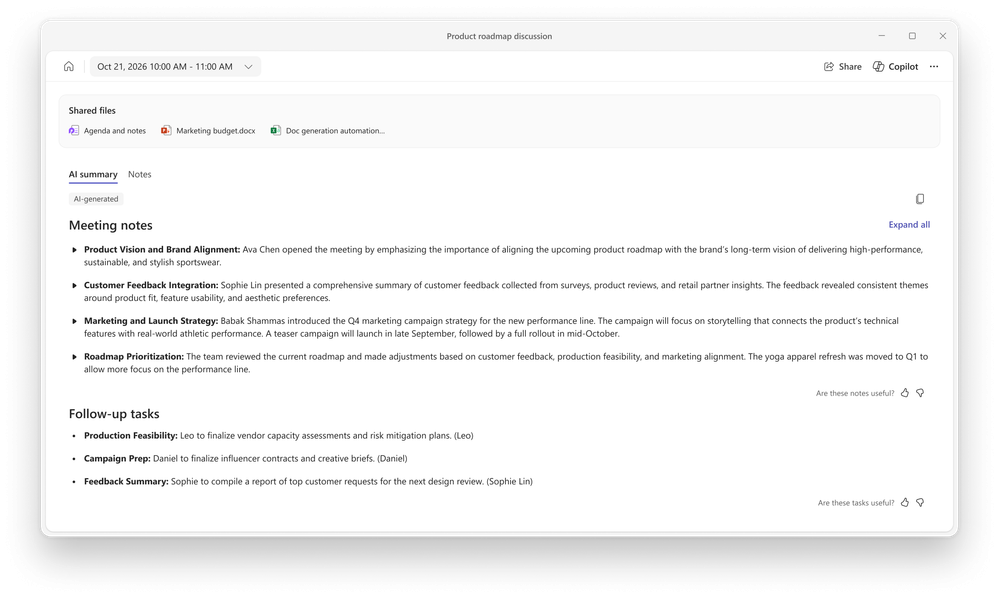
Review meeting recap details in Microsoft Teams.Tap or click to enlarge
Official product visual source: Microsoft. Vendor demonstration, not Digigen customer data.
Review the meaning, not only the wording
Compare the recap with the decisions participants actually made. Check whether it turns a suggestion into an agreement or assigns an action to the wrong person. Confirm dates, conditions and unresolved questions before circulating it.
For a meeting involving Thai and English speakers, ask the relevant participants to review terminology and intent. A readable English summary is not enough evidence that a mixed-language discussion has been represented accurately. Keep a clear correction route.
Test who can find the result
Use the intended participant accounts to inspect access to the recap. Check what happens for someone who joined only part of the discussion and where the organiser expects the record to be found. Record the outcome rather than relying on a screenshot from another account.
Write a short instruction for the organiser: what to tell participants, what to review afterwards and how to report a problem. Check the actual meeting and tenant settings before making that instruction part of a wider rollout.
Keep the human decision visible
The person responsible for the meeting should decide what becomes the final record. Make corrections before moving actions into a team tracker or sharing the summary beyond the original audience.
After a few internal trials, review useful results, corrections and support questions together. Digigen can help connect Teams configuration, information ownership and adoption. The goal is a clearer follow-through process, with people able to trust and challenge the record they use.
Questions teams ask
Does no saved transcript mean there is no meeting record?
No. A recap or other artefacts may still exist. Review the actual outputs and your organisation’s policy.
Does the feature establish compliance for our company?
No. Assess the setup against the relevant policies, contracts and professional advice.
Who should approve the recap before wider sharing?
Name the person responsible for the meeting record and give participants a clear way to correct it.
Plan a useful next step
Start with one task your team can test and a result someone can review. If you need help connecting the product to everyday work, speak with Digigen about configuration, adoption and a focused AI pilot.
Microsoft 365 in Singapore · Microsoft 365 in Thailand · Talk to Digigen